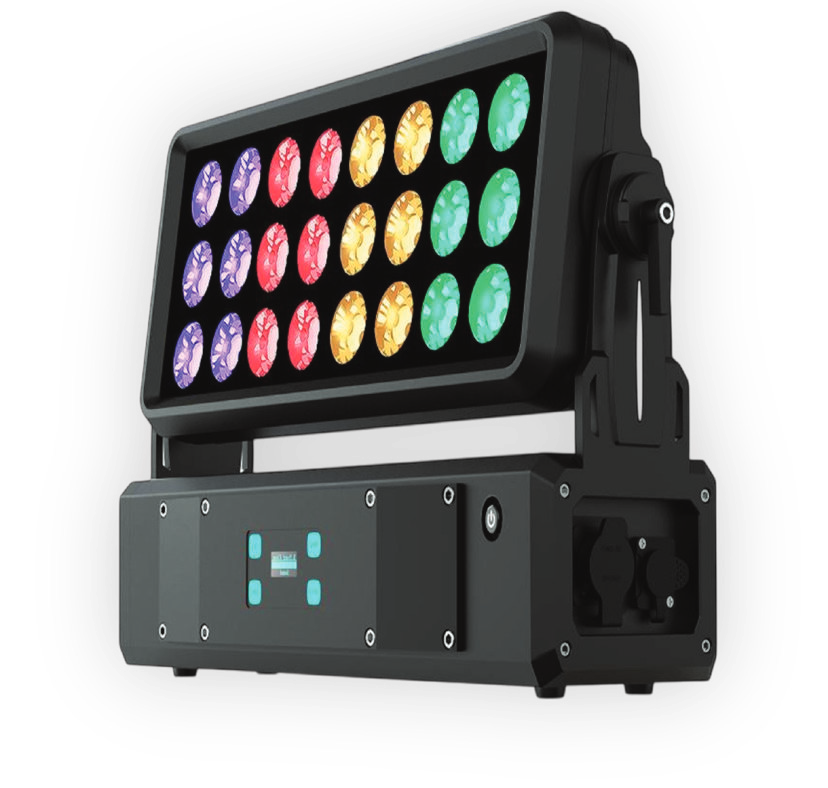
Model XS Wash IP
Edition EN · 09 / 2026 · V1
Document No. XSWIP-EN-01
24×10 W RGBW LED Wash · IP65
XS Wash IP
Compact RGBW wash light with segment control and IP65 protection for stages, clubs and temporary outdoor use
Operating manual. Please read in full before first use and keep for future reference.
Light source
24 × 10 WRGBW LED
Beam angle
25°fixed
DMX channels
4 – 345 channel modes
IP rating
IP65indoor & outdoor
Luminus Lighttech XS Wash IPForeword · About this document
Foreword
00Welcome
Thank you for choosing the Luminus Lighttech XS Wash IP — a compact, powerful RGBW wash light with segment control and IP65 certification for stage, club, installation and touring set-ups.
This document describes set-up, operation, care and troubleshooting of the fixture. Read the manual — in particular the chapter Safety Instructions — in full before first use and keep it with the fixture. If the fixture is passed on to third parties, the manual must be included.
0.1Symbols used
Warning
Marks situations in which persons may be injured or the fixture may be damaged. Always observe these instructions.
Note
Marks useful additional information, tips or explanations that aid understanding.
Danger — voltage
Marks situations involving danger to life from electric current. Work on live parts is reserved for qualified personnel only.
0.2Intended use
The XS Wash IP is built to IP65 and is suitable for typical indoor and outdoor applications such as stages, clubs, installations or touring set-ups. It is not suitable for coastal or maritime environments — the salty air prevalent there can lead to corrosion and increased wear of components. Damage caused by unsuitable environmental conditions is excluded from the manufacturer's warranty.
0.3Package contents
After unpacking, check the contents for completeness and transport damage.
Read this chapter in full before first use. Damage caused by disregarding these instructions is excluded from the warranty.
1.1General safety
Danger to life from electric current
Before any work on the fixture, the mains supply must be disconnected on all poles and secured against being switched on again. Before connecting, make sure that voltage and frequency of the mains supply match the rating label (280 W power supply, AC 100 – 240 V, 50 / 60 Hz).
Use only the supplied Seetronic power cable. Damaged cables or plugs must not be used.
The protective earth conductor (yellow / green) must be properly earthed to avoid electric shock.
Install the fixture in a well-ventilated location and do not cover any ventilation slots — the fixture has active cooling with temperature monitoring.
Keep flammable materials (curtains, decoration) away from the fixture — fire hazard.
Use the safety attachment point when mounting. Never carry or hold the fixture by the head only — always grip the housing.
Do not look directly into the LED source from a short distance — glare and risk of eye damage.
Do not touch any live wires during operation — risk of electric shock.
Before opening
Disconnect the fixture completely from the mains and let it cool down before touching or cleaning it. There are no user-serviceable parts inside — in case of faults, stop operation and contact your dealer. Never repair the fixture yourself.
The XS Wash IP is attached to a truss, a floor stand or directly to a surface via the two folding mounting brackets. Installation must be carried out by qualified personnel, out of reach of persons and not above walkways.
Fix the fixture firmly so that it cannot vibrate or slip during operation.
Additionally secure the fixture against falling via the safety attachment point.
Check all screw and clamp connections for tightness before each use.
Always fully connect power and DMX connectors (Seetronic, IP65) — only then is the protection rating maintained during operation.
IP65 rating — notes on outdoor use
The XS Wash IP is built to IP65. The housing completely prevents the ingress of dust and is protected against water jets from any direction.
Digit 6
Complete contact protection, dust-tight
Digit 5
Protection against water jets from any direction
Not for coastal or maritime environments
Although the fixture is IP-certified, it is not suitable for use in maritime or coastal environments. The salty air prevalent there can lead to corrosion and increased wear of components. Damage caused by unsuitable environmental conditions is excluded from the manufacturer's warranty.
Note
Always grip the fixture by the housing during transport and installation — never by the head only. The head contains the LED carrier and the tilt mechanism.
2 × folding mounting brackets, 1 × safety attachment point
Connectors
Power
Seetronic Power IN / OUT (IP65)
Data
Seetronic 3-pin DMX IN / OUT
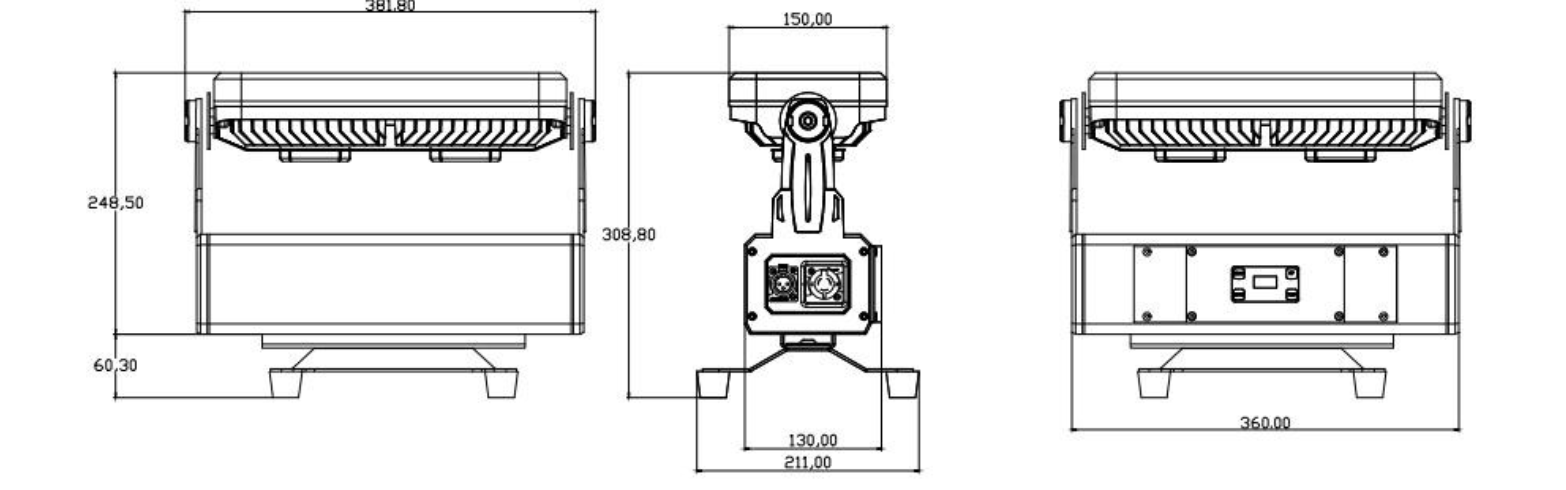
Fig. 2.1 — Dimensions in mm: front (width 381.8 · height 248.5 + 60.3 bracket), side (depth 150 / 211 incl. feet · height 308.8), rear (bracket spacing 360)
Segment effects
The 24 LEDs are grouped into 8 individually controllable segments — the XS Wash IP can thus display chase effects and segment colour changes directly in the wash field (see chapter 5.2).
Luminus Lighttech XS Wash IP03 · Set-up
Chapter 03
03Set-up
Unpack and inspectCarefully remove the fixture from the packaging and check for transport damage. Keep the packaging for transport or return shipment.
Choose the mounting locationWell-ventilated location; when used outdoors, observe the notes on IP65 and coastal proximity (chapter 1.2).
Fit the brackets & secureAttach the folding mounting brackets to the truss and lock them. Additionally secure via the safety attachment point.
Connect the DMX cableConnect the DMX output of the controller to DMX IN (Seetronic 3-pin); link through to the next fixture via DMX OUT.
Connect the power cablePlug in and lock the Seetronic power cable.
Set channel mode & DMX addressSet the channel mode (4/6/8/32/34 CH) and DMX address (1 – 512) via the display (see chapter 4).
Power onOnce power is applied the fixture is ready for operation; the active cooling regulates the LED temperature automatically.
3.1DMX address calculation
Each fixture occupies — depending on the channel mode — a fixed number of consecutive channels. The next fixture starts at start address + channel count. Addresses of the first three fixtures:
Channel mode
Fixture 1
Fixture 2
Fixture 3
4 CH
1
5
9
6 CH
1
7
13
8 CH
1
9
17
32 CH
1
33
65
34 CH
1
35
69
Luminus Lighttech XS Wash IP04 · Menu Map
Chapter 04
04Menu Map
The control panel has a 1.0″ TFT display and four buttons for menu navigation. The XS Wash IP can be operated stand-alone (Pixel · Auto · Macro · User · Sound) or via an external DMX controller.
Menu
Function
Range
Pixel
Dimmer
0 – 255
Strobe
0 – 255
Pixel (Segment)
0 – 008
Red / Green / Blue / White
0 – 255 each
Auto
Dimmer
0 – 255
Speed
0 – 255
Program
0 – 020
Macro
Dimmer
0 – 255
Strobe
0 – 255
Macro
0 – 022
User
Dimmer
0 – 255
Strobe
0 – 255
User
0 – 002
Red / Green / Blue / White
0 – 255 each
Sound
Dimmer
0 – 255
Speed
0 – 020
Note
“Pixel” mode allows direct control of individual segments (0 – 8). In “User” mode, up to two user-defined colour settings can be stored.
Luminus Lighttech XS Wash IP05 · DMX Control
Chapter 05
05DMX Control
The XS Wash IP offers five DMX channel modes (4 – 34 CH). This page describes the three simple modes 4 / 6 / 8 CH.
5.1 · 4-channel mode
CH
Function
Value
01
Red
0 – 255
02
Green
0 – 255
03
Blue
0 – 255
04
White
0 – 255
5.1 · 6-channel mode
CH
Function
Value
01
Main Dimmer
0 – 255
02
Strobe
0 – 255
03
Red
0 – 255
04
Green
0 – 255
05
Blue
0 – 255
06
White
0 – 255
5.1 · 8-channel mode
CH
Function
Value
01
Main Dimmer
0 – 255
02
Strobe
0 – 255
03
Dimmer Mode
see below
04
Speed
0 – 255
05
Red
0 – 255
06
Green
0 – 255
07
Blue
0 – 255
08
White
0 – 255
CH 03 · Dimmer mode — detail
0 – 25
Manual (CH 01 active)
26 – 35
Program 1
36 – 45
Program 2
46 – 55
Program 3
…
… (steps of 10 per program)
226 – 235
Program 21
236 – 255
Sound mode (microphone controlled)
Luminus Lighttech XS Wash IP05 · DMX Control
5.232- / 34-channel pixel mode
These two modes control the 24 LEDs of the wash field in 8 segments of 4 channels each (R/G/B/W) — allowing colour gradients and chase effects to be displayed directly in the wash field.
32-channel mode
Pure segment control, no global dimmer/strobe channel.
CH
Function
01–04
Segment 1 — Red / Green / Blue / White
05–08
Segment 2 — Red / Green / Blue / White
…
… (pattern repeats per segment)
29–32
Segment 8 — Red / Green / Blue / White
34-channel mode
As 32-CH mode, plus global dimmer and strobe in first position.
DMX mode inconsistent · addresses or channel modes not synchronised
Ensure uniform settings
6
Flickering in master/slave mode
Two master fixtures active · console not disconnected
Define only one master · disconnect DMX to the console
7
Colour errors on LEDs
LED socket loose · soldering fault · LED or driver defective
Check LED socket & cable · replace LED/driver
6.1Care instructions
Disconnect the fixture from power and let it cool down before cleaning.
Clean with a dry, lint-free cloth — do not use solvents.
Never open the fixture; maintenance by authorised dealers only.
Repairs by qualified personnel only
Never attempt to open or repair the fixture yourself. Repairs carried out by unqualified persons can lead to damage or malfunction and void the warranty.
Luminus Lighttech XS Wash IP— · Quick Reference
Appendix A
AQuick Reference Card
Tear out along the dashed line and keep at the desk or in the flight case.
TEAR OUT HERE
Quick Reference
XS Wash IP · DMX Modes
DMX channel modes
4 CH
R/G/B/W
6 CH
+ Dimmer · Strobe
8 CH
+ Dimmer Mode · Speed
32 CH
8 segments × RGBW
34 CH
+ Dimmer · Strobe
Start addresses (fixtures 1 – 3)
4 CH
1 · 5 · 9
6 CH
1 · 7 · 13
8 CH
1 · 9 · 17
32 CH
1 · 33 · 65
34 CH
1 · 35 · 69
Operating modes
DMX
External control
Auto
Internal program (0–20)
Master-Slave
Linked synchronous control
Sound
Microphone controlled (CH 03, 8-CH mode)
Key data
LEDs
24 × 10 W RGBW
Angle
25° fixed
IP rating
IP65
Weight
8.0 kg
First aid — fault diagnosis
—
No light? → check fuse & power supply
—
No DMX? → check DMX mode + cable
—
Flickering? → synchronise addresses/modes
—
Not for coastal / maritime environments!
Luminus Lighttech XS Wash IP · Quick Reference · Edition EN 09/2026 · V1Full manual in the booklet
Luminus Lighttech XS Wash IP— · CE Declaration of Conformity
Appendix B
BEU Declaration of Conformity
The manufacturer declares under its sole responsibility that the product described below complies with the relevant harmonisation legislation of the European Union.
EU Declaration of Conformity
A signed EU Declaration of Conformity exists for this product. It is not part of this manual and can be requested from us at any time — by email to verkauf@lexvision.de or by phone on +49 (0) 651 14567727, quoting the product designation.
Note
The signed EU Declaration of Conformity for this product can be requested from F. & M. Vertrieb GmbH, Waldweg 26, 54636 Sefferweich, Germany.